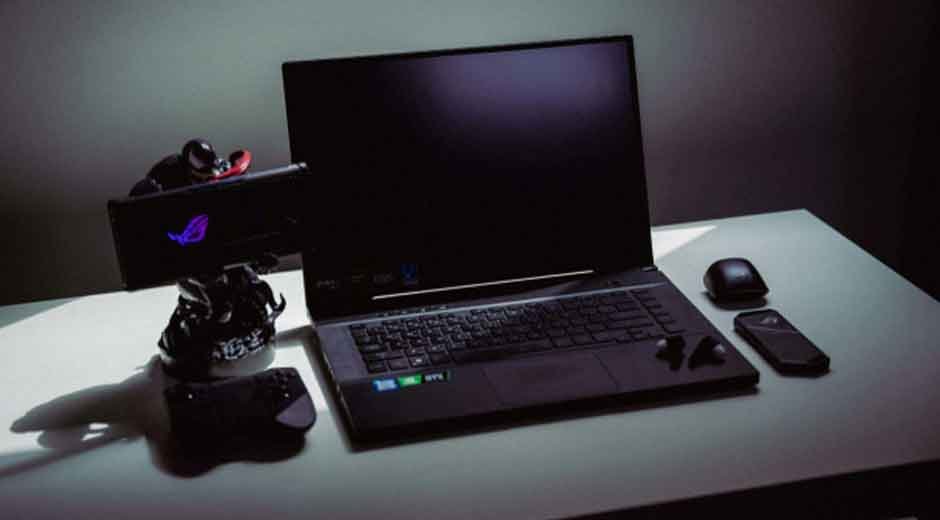
Your gaming rig glows softly in the corner of your room, waiting. It’s more than just a collection of electronics—it’s your portal to other worlds, your competitive arena, your creative studio. But here’s the thing: even the most powerful hardware falls short without the right supporting cast. Building the ultimate gaming setup isn’t about throwing money at the most expensive components. It’s about understanding how each piece works together to create something greater than the sum of its parts.
Whether you’re a competitive esports player chasing millisecond advantages, a streamer crafting immersive content, or simply someone who wants their gaming sessions to feel extraordinary, the right combination of gadgets and accessories transforms good gameplay into something unforgettable.
Choosing the Right Gaming Laptop
At the heart of any mobile or flexible gaming setup sits your laptop—the command center that powers everything else. This isn’t a decision to rush. Your gaming laptop determines what titles you can play, how smoothly they run, and how future-proof your investment will be. Unlike desktop PCs where you can swap components freely, laptops require getting things right from the start. Finding the best gaming laptop for your needs is the most critical step in this process.
Performance Specs That Matter
Let’s talk numbers, but in a way that actually makes sense. Your CPU handles the game’s logic—think physics calculations, AI behavior, and overall game management. For serious gaming, you’ll want at least an Intel Core i7 or AMD Ryzen 7 processor. The GPU is your visual workhorse, rendering those stunning graphics you’re chasing. NVIDIA’s RTX 40-series or AMD’s latest offerings provide the muscle needed for high settings and ray tracing.
RAM might seem boring, but 16GB is your minimum for smooth multitasking—streaming, Discord, and multiple browser tabs alongside your game. Consider 32GB if you’re into content creation or running resource-heavy titles. Storage deserves attention too: a 1TB NVMe SSD gives you speed and space, though you can supplement with external drives later.
Display quality separates mediocre experiences from magical ones. A 144Hz refresh rate should be your baseline—it makes everything feel smoother and more responsive. Competitive players often push to 240Hz or even 360Hz for that extra edge. Screen size balances portability with immersion: 15.6 inches hits a sweet spot, while 17-inch panels maximize visual real estate for those who rarely move their laptop.
Portability vs. Power
Here’s where gaming laptops get interesting. On one end, you have svelte machines that slip into backpacks and handle business meetings as gracefully as gaming sessions. For anyone who values mobility without sacrificing performance entirely, a thin gaming laptop delivers impressive specifications in remarkably compact form factors, making them perfect for gamers on the move. These portable powerhouses typically weigh under five pounds and feature efficient cooling systems.
Desktop replacements sit on the opposite end—hulking beasts with desktop-class processors, massive cooling systems, and every port imaginable. They’re heavy, loud, and usually tethered to outlets, but they deliver uncompromising performance. Choose based on your lifestyle: if you game in multiple locations or travel frequently, go portable. If your laptop lives on a desk and rarely moves, prioritize raw power.
Accessories for Gaming Laptops
Even the best laptop benefits from strategic accessories. Cooling pads address thermal throttling, especially during marathon sessions. They’re simple—fans that blow air underneath your laptop—but they can drop temperatures by 5-10 degrees, maintaining peak performance longer.
External monitors unlock proper ergonomics and expanded screen real estate. Gaming on a 27-inch display at eye level beats hunching over a laptop screen every time. Docking stations transform your laptop into a desktop experience with one cable—connecting your monitor, keyboard, mouse, and peripherals simultaneously. When you need to leave, just unplug and go.
Must-Have Gaming Accessories
Your laptop might be the engine, but accessories make the machine sing. These peripherals directly impact how you interact with games, and getting them right means the difference between average gameplay and consistently crushing your opponents.
Keyboards and Mice
Mechanical keyboards aren’t just about that satisfying click—they offer precise actuation points, faster response times, and durability that outlasts membrane alternatives. Cherry MX, Razer, or Logitech switches each provide different feels: tactile, linear, or clicky. Try before buying if possible, because keyboard preference is deeply personal.
Gaming mice need to feel like extensions of your hand. DPI (dots per inch) adjustability lets you toggle between precision aiming and quick movements. Most gamers settle between 400-1600 DPI for shooters. Ergonomics matter more than flashy RGB—if your hand cramps after an hour, that’s a deal-breaker. Customizable buttons add convenience for complex games with dozens of abilities or macros.
Headsets and Audio Gear
Audio isn’t just atmospheric—it’s tactical information. Surround sound headsets help you pinpoint footsteps, reloads, and directional cues that give competitive edges. Noise-canceling features block distractions, keeping you immersed whether you’re in a quiet room or chaotic household.
Wireless headsets eliminate cable tangles and movement restrictions, perfect for streamers who gesture while talking. Wired alternatives still edge out wireless for absolute audio fidelity and zero latency, though the gap narrows yearly. Comfort matters too: plush ear cups and adjustable headbands prevent the dreaded “gaming headset headache” during long sessions.
Controllers and Input Devices
Keyboard and mouse reign supreme for shooters and strategy games, but some genres feel better with controllers. Fighting games, racing simulators, platformers, and sports titles practically demand them. Modern controllers connect seamlessly to gaming laptops via Bluetooth or USB, with Xbox and PlayStation controllers being universally compatible.
Consider specialty input devices too: racing wheels for simulators, flight sticks for space games, or fighting game arcade sticks for precise inputs. These niche peripherals won’t suit everyone, but they transform specific genres from casual fun into deeply engaging experiences.
Setting Up the Ultimate Display
Monitors deserve careful consideration—they’re what you’ll stare at for hours, and the right choice dramatically impacts both performance and eye comfort.
Refresh Rate and Resolution
Refresh rate determines how many frames per second your monitor can display. A 144Hz monitor shows 144 frames every second, making motion appear fluid compared to standard 60Hz displays. Competitive players often choose 240Hz or higher, prioritizing smoothness over resolution for that split-second advantage in fast-paced games.
Resolution affects clarity and sharpness. 1080p (Full HD) remains popular for high refresh rate gaming because it’s less demanding on your GPU, allowing higher frame rates. 1440p (QHD) balances visual fidelity with performance beautifully—games look noticeably crisper without crushing frame rates. 4K gaming delivers stunning detail but requires serious graphics horsepower to maintain playable frame rates.
The sweet spot for most gamers? A 1440p display running at 144Hz or higher. You get gorgeous visuals and smooth gameplay without needing a second mortgage for your graphics card.
Monitor Placement & Desk Setup
Position your monitor about an arm’s length away, with the top of the screen at or slightly below eye level. This reduces neck strain during extended sessions. Multi-monitor setups amplify productivity and immersion—primary gaming display centered, secondary screen for Discord, streams, or guides angled slightly inward.
Cable management transforms chaotic desk spaghetti into clean, organized spaces. Use cable raceways along desk edges, velcro straps to bundle wires, and cable clips to route everything neatly. Not only does this look better, it makes troubleshooting connections infinitely easier and reduces accidental unplugging during intense gaming moments.
Mobile Gaming Integration
Don’t underestimate smartphones as gaming companions. Modern mobile devices pack serious power and integrate beautifully with your primary setup.
Gaming on Phones
High-end gaming phones feature rapid refresh rate displays, enhanced cooling systems, and processors rivaling some laptops. They’re perfect for gaming on commutes, during travel, or when your main setup isn’t accessible. Titles like Genshin Impact, Call of Duty Mobile, and PUBG Mobile deliver surprisingly deep experiences that look stunning on flagship displays.
Some gamers connect their phones to their setup as secondary displays using apps like Spacedesk, or use them for remote play, streaming their PC games to mobile devices for couch gaming. Others leverage companion apps that provide maps, stats, or inventory management for their PC games. If you’re curious about the latest flagship options that excel at mobile gaming, platforms offering devices like the M1 showcase cutting-edge technology that bridges the gap between mobile convenience and serious gaming capabilities.
Accessories for Mobile Gaming
Mobile game controllers clip onto phones or connect wirelessly, bringing console-style controls to mobile titles. They’re game-changers for action games where touchscreen controls feel clumsy. Phone cooling fans attach magnetically, preventing thermal throttling during graphically intensive sessions.
Portable battery packs ensure your gaming doesn’t die mid-match. Look for high-capacity options (20,000mAh or more) with fast charging support. Phone holders and stands free your hands during streaming or when using your phone as a second screen. These accessories are affordable but dramatically enhance mobile gaming experiences.
Gaming Furniture and Comfort Essentials
Performance means nothing if you’re uncomfortable. Ergonomic furniture isn’t luxury—it’s essential for health and sustained focus during long sessions.
Gaming Chairs
Quality gaming chairs support your spine’s natural curve with adjustable lumbar pillows, preventing the back pain that plagues desk warriors. Look for chairs with adjustable armrests, seat height, and recline angles. Materials matter: breathable mesh keeps you cool, while leather looks premium but can get warm.
Price ranges vary wildly. Budget options start around $150-200 and provide basic ergonomics. Mid-range chairs ($300-500) offer better adjustability and durability. Premium options ($600+) feature superior materials and engineering but face diminishing returns beyond a point. Test chairs if possible—comfort is subjective.
Desks and Workstations
Height-adjustable standing desks combat sedentary gaming lifestyle. Alternate between sitting and standing throughout the day, improving circulation and reducing fatigue. If standing desks exceed your budget, even a spacious fixed-height desk with proper dimensions (at least 48 inches wide, 24 inches deep) provides room for dual monitors and accessories without crowding.
Built-in cable management, monitor arms, and keyboard trays add functionality. Surface material affects durability—laminate works fine for most, while hardwood or bamboo offer premium aesthetics and longevity.
Lighting and Ambience
RGB lighting strips mounted behind monitors or desks create ambient backlighting that reduces eye strain and looks spectacular. Smart bulbs let you adjust room lighting based on game atmosphere or time of day. Task lighting like desk lamps prevents glare on screens while providing focused light for peripherals or streaming facecams.
Don’t go overboard—too much RGB becomes distracting rather than immersive. Subtle, coordinated lighting creates atmosphere without overwhelming your senses during gameplay.
Storage, Organization, and Delivery Solutions
Once you’ve invested in quality gear, protecting and organizing it properly extends its lifespan and keeps your space functional.
Storage for Accessories
Drawer organizers keep smaller accessories—cables, controllers, game cartridges—sorted and accessible. Wall-mounted shelves display collectibles while keeping surfaces clear. Dedicated controller stands or headset hangers prevent damage and add visual appeal to your setup.
Cable organizers deserve special mention. Labeled cables, velcro ties, and cable boxes transform tangled messes into manageable systems. Future you will appreciate present you’s organizational efforts when troubleshooting or upgrading components.
Fast Delivery and Courier Services
When excitement strikes for new gear, waiting feels eternal. Reliable shipping services matter more than you’d think when building or upgrading your setup. Finding a dependable delivery courier ensures your expensive gaming equipment arrives safely and promptly, properly packaged with tracking information for peace of mind.
When ordering online, read seller ratings carefully and verify return policies before purchasing high-value items like gaming laptops. Insurance on expensive shipments protects your investment. Track packages closely and inspect everything immediately upon arrival—document any damage before signing for delivery.
Software, Maintenance, and Optimization
Hardware is half the equation. Software optimization and regular maintenance keep everything running smoothly.
Performance Optimization Tools
Driver updates sound boring but directly impact performance. Graphics driver updates often boost frame rates in new titles by 10-15%. Tools like MSI Afterburner let you monitor temperatures and frame rates, helping identify bottlenecks. Game optimization software like Razer Cortex or GeForce Experience automatically configure graphics settings for optimal performance.
Cleaning software removes junk files and manages startup programs that slow boot times. Just avoid aggressive “PC cleaner” scams—Windows’ built-in tools handle most optimization needs.
Regular Maintenance
Dust is gaming hardware’s silent killer. Clean your laptop vents, keyboard, and accessories monthly using compressed air. Check cable connections periodically—loose plugs cause mysterious issues. Update firmware for peripherals and check for software updates regularly.
Batteries in wireless peripherals don’t last forever. Keep spares handy or maintain charging schedules. Clean mouse pads and keyboard surfaces to maintain responsive inputs. These small maintenance habits prevent bigger headaches later.
Gaming Communities and Support
You’re not alone in this journey. Online communities on Reddit, Discord, and dedicated forums overflow with advice, troubleshooting help, and optimization tips. YouTube channels offer detailed setup guides and reviews. Don’t hesitate to ask questions—the gaming community generally welcomes newcomers eager to learn.
Manufacturer support forums address product-specific issues. Bookmark these resources before problems arise, making troubleshooting faster when issues inevitably occur.
Future-Proofing Your Gaming Setup
Technology evolves relentlessly. Building with future upgrades in mind saves money and frustration long-term.
Choose components with headroom for growth. Extra RAM slots, additional storage bays, and powerful PSUs in desktop setups enable easy upgrades. For laptops, prioritize models with Thunderbolt ports for external GPU options down the road.
Emerging technologies like VR gaming, cloud gaming services, and AI-enhanced graphics will reshape gaming experiences. While you don’t need to buy into every trend immediately, maintaining awareness helps you plan strategic upgrades. Modular accessories—swappable mouse grips, customizable keyboard layouts—extend product lifespans by adapting to changing preferences.
Set upgrade budgets annually rather than overhauling everything at once. Incremental improvements—new monitor this year, GPU upgrade next—keep your setup current without breaking the bank. Follow tech news selectively, focusing on developments that genuinely impact your gaming experience rather than chasing every new release.
Conclusion
Building the ultimate gaming setup isn’t about assembling the most expensive components—it’s about creating a cohesive environment where every element serves your gaming goals. From selecting the right gaming laptop as your foundation, through carefully chosen accessories that enhance performance and comfort, to the ergonomic furniture that supports hours of play, each decision compounds into an experience greater than individual parts suggest.
Mobile integration extends your gaming reach beyond your desk. Proper organization and maintenance protect your investment while keeping everything accessible. Thoughtful planning for future upgrades ensures your setup evolves alongside your needs and emerging technology.